Plugin: Academic Blogger’s Toolkit
Every now and then a WordPress plugin comes along that I instantly know will be a useful game-changer for many TruBox and OpenETC users. I recently installed this plugin on both servers and will take a few paragraphs to show you what it does. The Academic Blogger’s Toolkit (ABT) helps you manage citations and bibliographies in WordPress-based writing. Oh, this is a Gutenberg (Block editor) plugin so you are out of luck if you are a Classic editor person.
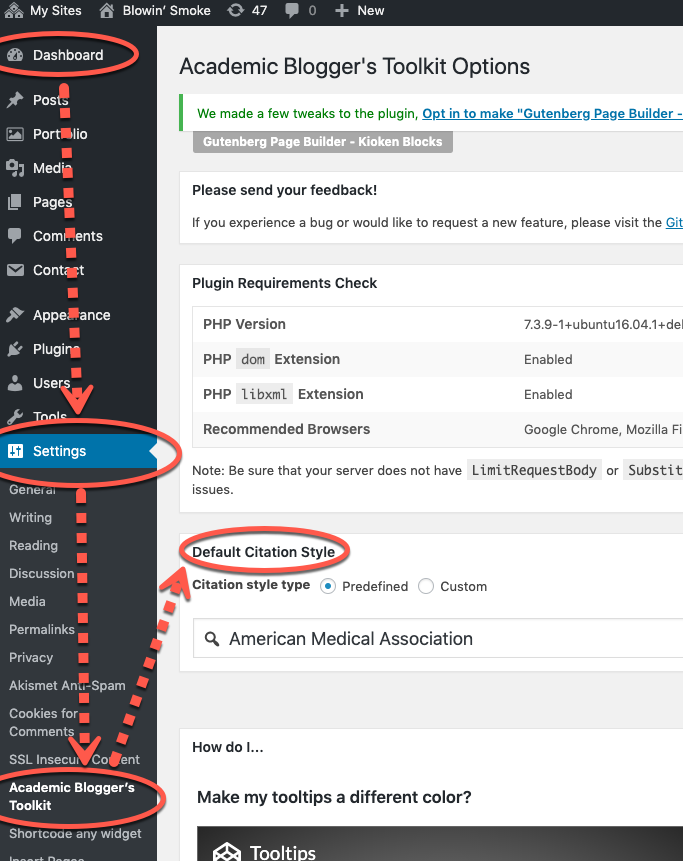
Once you activate it on your site you have a setting to take care of before you use it, that’s right, selecting your citation style. That is taken care on the Dashboard => Settings => Academic Blogger’s Toolkit screen as demonstrated below. Start typing the name of your style guide (acronyms seem to work), select it from the list and click save in the panel. There are lots of citation styles available.
Okay, that’s all we have to do there for now. Let’s see how it works. The scenario is as follows: I have all my citations in my regular citation manager, Zotero (recently moved from Endnote to Zotero, let’s please not have the ‘favourite’ citation manager argument.) I’m going to export citations, in this case just a couple I think I will need (see notes below) for this article from Zotero to an .ris file. RIS is a common format for importing and exporting to and from citation managers.
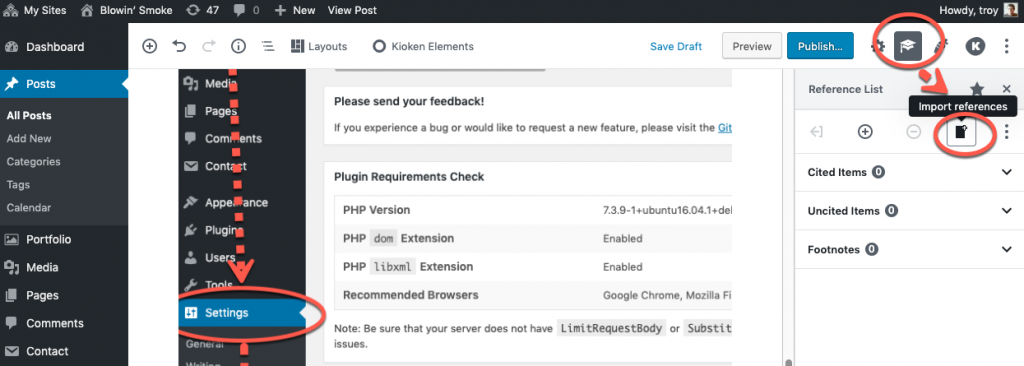
Now to get my sources into the ABT. I need to first switch my right sidebar to the ABT panel (see image below). Then I will use the import button, find the file on my computer in the file selection dialog box and import it.
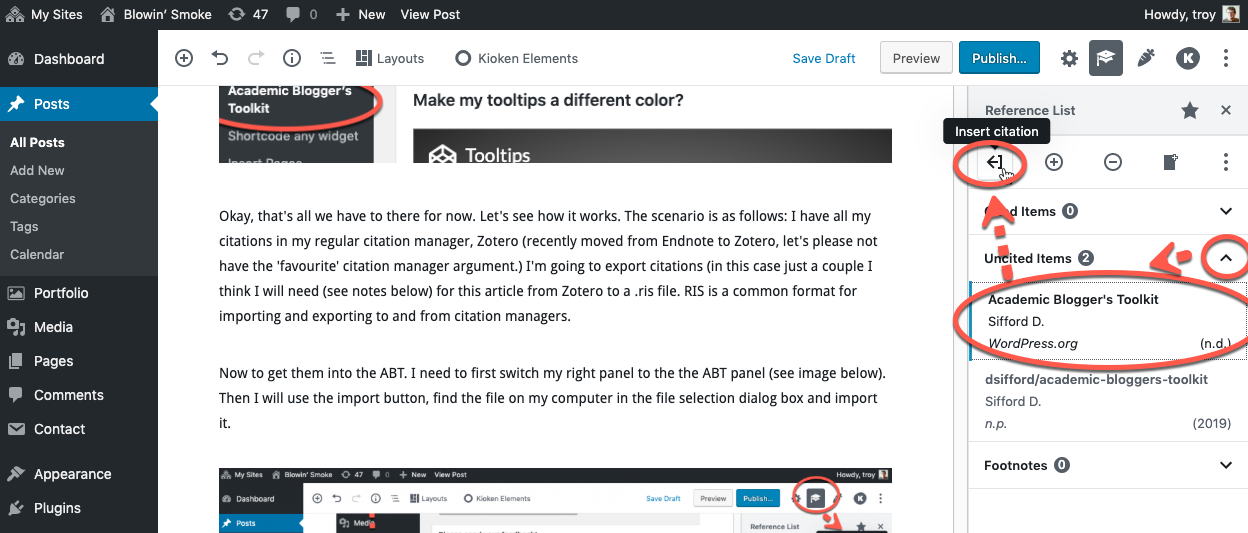
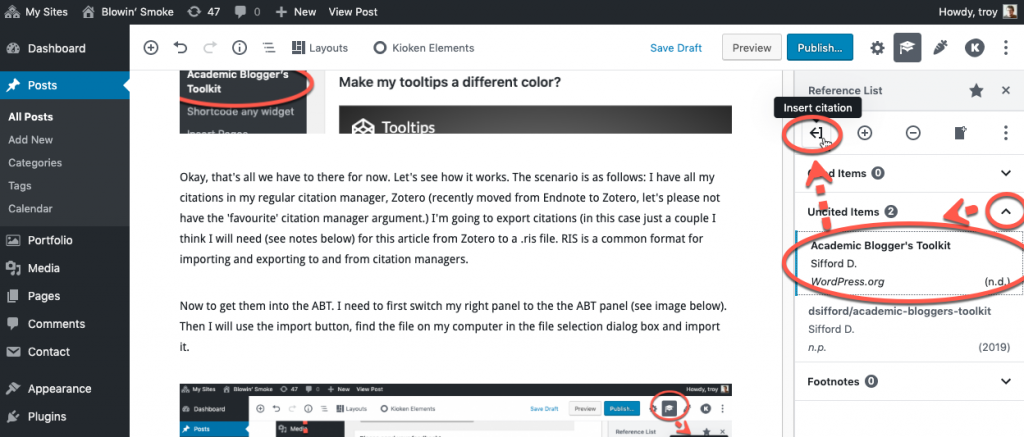
We now have our references in the ABT panel. We have not cited anything, so they all appear in the “Uncited Items” area. Let’s put in a citation and see how that works. I’ll put the citation for the Academic Blogger’s Toolkit plugin webpage on wordpress.org right here. (D. P. Sifford 2019) What I did was position my cursor in my text where I wanted the citation, open the “Uncited Items” panel, selected my citation (I could have selected more than 1 using the shift or control key as I was selecting them), and then clicked the “Insert citation” button as seen in the image below.
You will notice a couple of happy byproducts of inserting a citation: ABT begins to build the bibliography and puts it in a block at the bottom of the page. Also, it moves the reference from the uncited group to the cited group so that you can keep track of usage and additional citations against the given reference.
That’s probably enough to get you going. See below for some additional notes and a handy link or two.
Notes, links and documentation
Unless your needs are simple I don’t think that the Academic Blogger’s Toolkit will replace your primary citation manager. There are features such as citation notes, attached full text and files, and others that are not provided for in ABT.
I am taking a “bring in just the references I might need for this article” approach to ABT usage for now rather than a “bring every citation I’ve every gathered” approach. I’ll be keeping my main citation manager anyway, and this seems more prudent.
On the subject of footnotes. You may have noticed the footnotes group. To be honest I haven’t figured out how that one works yet. If you use certain styles, such as AMA, it will create footnote-like citations, but they still appear in Cited group rather than Footnotes group. (This I imagine lets you change your citation style at any time.)
If you follow the link to the plugin listing on the WordPress site (D. P. Sifford 2019) you will find that the plugin author’s primary working location is his github.com repository(D. Sifford 2019). (Github is a nerdy place where programmers store their code for distribution, version control, collecting and responding to issues and so forth.) This plugin author also stores documentation for ABT there. You can go the the link directly https://github.com/dsifford/academic-bloggers-toolkit/wiki (D. Sifford 2019), or you can access the ‘three vertical dots’ menu in the ABT manual to access the “Usage instructions” link to get to the same place. (There are two ‘three vertical dots’ menus, make sure you access the one directly across from the insert citation button.)
That’s it for now, have a great day.
- Sifford, Derek. 2019. “dsifford/academic-bloggers-toolkit.” GitHub. https://github.com/dsifford/academic-bloggers-toolkit.
- Sifford, Derek P. 2019. “Academic Blogger’s Toolkit.” WordPress.Org. Accessed November 8. https://wordpress.org/plugins/academic-bloggers-toolkit/.


![A tale of two [mattermost servers, container types, databases]](https://cmns3551-videos.trubox.ca/wp-content/uploads/sites/3467/2018/02/ataleoftwocities-768x600.jpg)

Leave a Reply